
0
 Ready Boost is a great feature by Windows to Speed up your PC performance using compatible pen drives. However, it boosts your system speed as it works as a Virtual RAM for your Computer, thereby Improving PC performance. It's just like using your Pen drive/SD Card/Flash drive as RAM. It is a feature that every Windows user should take benefit of!!!
There are some requirements of your PEN/FLASH drives too-
Steps to Enable Ready Boost:-


Now you will experience increase in your PC Speed.
So, I hope you find my article useful!!
Kindly post comments on "Use Ready Boost to Speed up your PC performance"!!!
 Read More
Use Ready Boost to Speed up your PC performance

There are some requirements of your PEN/FLASH drives too-
- It should have at least 1 GB storage capacity.
- It should have 512 MB free data.
Steps to Enable Ready Boost:-
- Plugin your pen drive into your USB port. A dialog box will pop-up asking you what you want to do with your pen drive.
- To speed up your system using ready boost,Click on Speed up my System using Windows Ready Boost.
- A new dialog box will appear showing you the Ready Boost Properties. You can even configure the Space of your pen drive you want to use to increase system speed.
- Click on Apply and hit OK.
Now you will experience increase in your PC Speed.
So, I hope you find my article useful!!
Kindly post comments on "Use Ready Boost to Speed up your PC performance"!!!
Read More
0
Read More
Tricks to Increase your Internet Speed
A Slow Internet Connection really costs time and makes you feel annoying. Many people ask me the ways to Increase their Internet Speed. However, it's possible to do so to some extent and Make your Internet much better then it was in the past. However, There are some tweaks and softwares that will help you to Increase your Internet Speed.
(1) Speed up your Internet Speed by 20%:
This is the first method to speed up your internet. This method might be known to most of the people. But still I want to share this with you!! However, this method help you to increase your Internet Speed by 20%. Just follow the steps below:
Improve youtube performance in Firefox and all other Browsers
You can even improve your Firefox Internet speed to a great extent by making some changes into it.
Get this method here.
(5) Some tips from my side:
I strongly recommend you to upgrade your broadband Plan to experience a faster and more stable Speed.
So, I hope this article was useful to you!!!
Please share your views via comments on "Tricks to Increase your Internet Speed"!!!

(1) Speed up your Internet Speed by 20%:
This is the first method to speed up your internet. This method might be known to most of the people. But still I want to share this with you!! However, this method help you to increase your Internet Speed by 20%. Just follow the steps below:
Go to start.
Go to run.
Type gpedit.msc and hit enter.
Expand Administrative Templates.
Then Network.
Then QoS Packet Scheduler.
A new list will appear. Click on Limit Reservable Bandwidth.
Just Disable it.
Click on Apply.
Hit OK. You're done!!
Now just restart your Computer. You will experience a change in your Speed.
(2) Free Accelerators to Speed up your Internet:
In this second method, I am providing Internet Accelerators to Speed up your Internet. However, these are some small utilities that will tweak and optimize your internet settings for you, and thereby, Speeding up your Internet.
Ashampoo Internet Accelerator
This utility comes with an awesome tool that will optimize and tweak your internet settings within a single click. It also has a feature to test your Connection speed.
Download Ashampoo Internet Accelerator 3 Here
Register for a Free trial for Ashampoo Internet Accelerator from here
Go to run.
Type gpedit.msc and hit enter.
Expand Administrative Templates.
Then Network.
Then QoS Packet Scheduler.
A new list will appear. Click on Limit Reservable Bandwidth.
Just Disable it.
Click on Apply.
Hit OK. You're done!!
Now just restart your Computer. You will experience a change in your Speed.
(2) Free Accelerators to Speed up your Internet:
In this second method, I am providing Internet Accelerators to Speed up your Internet. However, these are some small utilities that will tweak and optimize your internet settings for you, and thereby, Speeding up your Internet.
Ashampoo Internet Accelerator
This utility comes with an awesome tool that will optimize and tweak your internet settings within a single click. It also has a feature to test your Connection speed.
Download Ashampoo Internet Accelerator 3 Here
Register for a Free trial for Ashampoo Internet Accelerator from here
You can also try other accelerators like:
Speed Connect
Internet Accelerator
(3) Use TCP Optimizer to Boost Speed
TCP Optimizer is a Small tool helping you to optimize and tune up your Internet Speed.
Download TCP Optimizer
Speed Connect
Internet Accelerator
(3) Use TCP Optimizer to Boost Speed
TCP Optimizer is a Small tool helping you to optimize and tune up your Internet Speed.
Download TCP Optimizer
(4) Ways to Boost Speed in Firefox
You can use Speedyfox to increase your Internet Speed.
You can view our one of our previously posted article for this.
You can view our one of our previously posted article for this.
Speedyfox: Firefox Speed Booster
And you can even Improve your youtube performance in Firefox and all other browsers.You can view our one of our previously posted article for this.
And you can even Improve your youtube performance in Firefox and all other browsers.You can view our one of our previously posted article for this.
Improve youtube performance in Firefox and all other Browsers
You can even improve your Firefox Internet speed to a great extent by making some changes into it.
Get this method here.
(5) Some tips from my side:
- Use IDM to boost your Downloading Speed.
- Try Downloading torrents using IDM.
- Use a Good Anti-virus in your Computer.
- Remove unwanted add-ons,softwares,unwanted files from your computer.
- Update your drivers periodically.
- Keep a good maintenance of your Computer.
I strongly recommend you to upgrade your broadband Plan to experience a faster and more stable Speed.
So, I hope this article was useful to you!!!
Please share your views via comments on "Tricks to Increase your Internet Speed"!!!
Read More
1
 Downloading Torrents with High Speed is a great need nowadays. As torrent files are a better alternative to download various games,softwares,movies,etc. Well, Even I sometimes feel that torrents are very slow to download files as compared to a normal download speed. The speed is too slow in any torrent files down-loader. So, I found a way to download torrent files using IDM. It is true that now you can download torrents using IDM. If you are not using IDM, them download IDM 6.07 Build 14 (latest version) of IDM from HERE.
Follow the steps to Download Torrent files using IDM:
(1.)Firstly Grab your torrent from www.torrentz.eu . Download the torrent file (.torrent) extension file of your desire.
(2.)Now after downloading the (.torrent) file, go to this website www.torcache.net
Now upload the torrent file that you had just downloaded and click on cache button.
(3.)It will show you a new generated link of your torrent file.
(4.)Copy that new link.
(5.) Now go to www.torrific.com and create a new account there. After signing up, Login into your Account.
(6.)In the text field, paste the link of the new torrent file that you had copied in Step 4 and Click on GET.
(7.) You will see all the torrent files that are present in that torrent. Now click on Initiate Bittorrent Transmission.
(8.) Now all the files have been ready to be downloaded. Click on any file that you want to download.
(9.) A new pop-up window of IDM will open.
(10.) Click on Start Downloading.
So, this trick helps to download torrents with high speed. Well, If you are having a slow torrent download speed, I strongly recommend you to use this software.
So, Enjoy downloading torrents at high speed using IDM.
So, I hope you will enjoy downloading torrents at high speed using IDM!!
Kindly Like us on Facebook.
Do not forget to Subscribe to our feeds.
Kindly share our views via comments on "Trick to Download Torrents using IDM"!!!
Read More
Trick to download torrents using IDM

Follow the steps to Download Torrent files using IDM:
(1.)Firstly Grab your torrent from www.torrentz.eu . Download the torrent file (.torrent) extension file of your desire.
(2.)Now after downloading the (.torrent) file, go to this website www.torcache.net
Now upload the torrent file that you had just downloaded and click on cache button.
(3.)It will show you a new generated link of your torrent file.
(4.)Copy that new link.
(5.) Now go to www.torrific.com and create a new account there. After signing up, Login into your Account.
(6.)In the text field, paste the link of the new torrent file that you had copied in Step 4 and Click on GET.
(7.) You will see all the torrent files that are present in that torrent. Now click on Initiate Bittorrent Transmission.
(8.) Now all the files have been ready to be downloaded. Click on any file that you want to download.
(9.) A new pop-up window of IDM will open.
(10.) Click on Start Downloading.
So, this trick helps to download torrents with high speed. Well, If you are having a slow torrent download speed, I strongly recommend you to use this software.
So, Enjoy downloading torrents at high speed using IDM.
So, I hope you will enjoy downloading torrents at high speed using IDM!!
Kindly Like us on Facebook.
Do not forget to Subscribe to our feeds.
Kindly share our views via comments on "Trick to Download Torrents using IDM"!!!
Read More
3
 Watching youtube videos without buffering is a great need because every youtube lover wants it.Is your Browser too slow that it plays youtube videos as slow as a turtle???. Sometimes I get frustrated by the pauses that it takes after each 3 seconds. Sometimes this makes me bang my computer. It is a big headache for the youtube lovers. But I found the solution for this. However,this trick it will enhance your youtube video's speed to a convenient way and make your entertainment while watching videos more reliable!!!
Steps to Improve your youtube Performance in Firefox:-

Software to Boost youtube performance in all other browsers:-
There is a software know as Speedbit Video Accelerator. It ill help you to eliminate buffering and help you enjoy watching videos. It will work for all browsers like Firefox and Chrome.
DOWNLOAD HERE
Also make sure that you are using the latest version of Adobe flash Player.
So, I hope you have enjoyed my article!!!Kindly share your views "Boost youtube performance in Firefox and other browsers"!!
Read More
Boost youtube performance in Firefox and other browsers
Watching youtube videos without buffering is a great need because every youtube lover wants it.Is your Browser too slow that it plays youtube videos as slow as a turtle???. Sometimes I get frustrated by the pauses that it takes after each 3 seconds. Sometimes this makes me bang my computer. It is a big headache for the youtube lovers. But I found the solution for this. However,this trick it will enhance your youtube video's speed to a convenient way and make your entertainment while watching videos more reliable!!!Steps to Improve your youtube Performance in Firefox:-
- Open Firefox and in the address bar, type "about:config" and hit enter.
- It will show you a warning message. Just ignore it and click on I'll be careful, I promise.
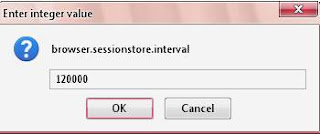
- Then in the filter text entry bar, type "browser.sessionstore.interval" you will see something like below.

Just Double click on it and change its value to 120000.

Software to Boost youtube performance in all other browsers:-
There is a software know as Speedbit Video Accelerator. It ill help you to eliminate buffering and help you enjoy watching videos. It will work for all browsers like Firefox and Chrome.
DOWNLOAD HERE
Also make sure that you are using the latest version of Adobe flash Player.
So, I hope you have enjoyed my article!!!Kindly share your views "Boost youtube performance in Firefox and other browsers"!!
Read More
